
Week 14 - Facebook Ads


The first Facebook ad I picked was the "Get More Leads" option. I decided on this approach because I felt it was a great way to find prospective sellers. 


The second facebook ad I picked was the "Promote Your Business Locally" option. I tried to change my radius to 25miles, but for some strange reason, Facebook would not let me update it.  I did some research on a homeowners average age, which resulted in me choosing an age range of 40 to 65+.   I felt like this would be my target audience who could benefit from my service.
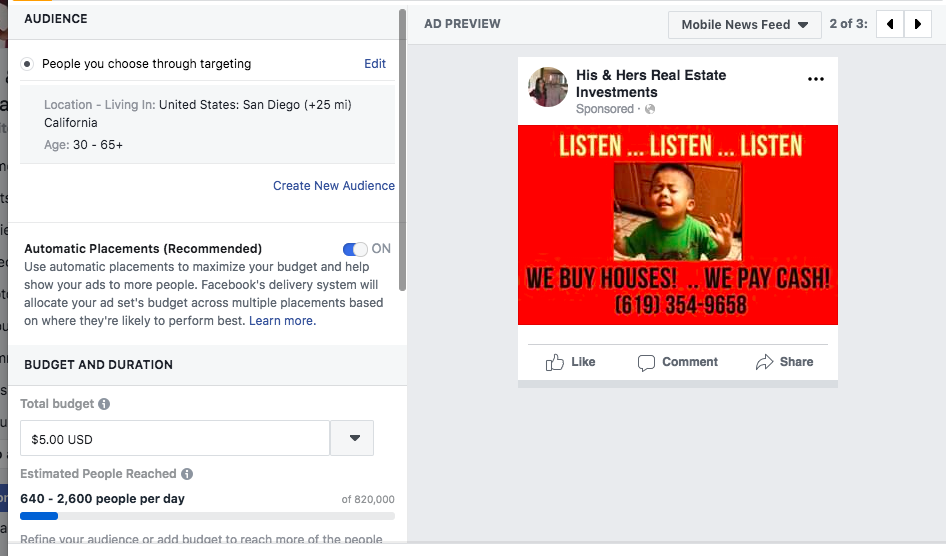
The third Facebook ad I picked was the "Boost A Post".  I picked the age range of 30 - 65+ as I wanted my services to reach as many people as possible.   Additionally,  I did some research and learned that the average age of a new homeowner is in their 30's. Although they may not need my services per se, they might pass along my information to a  neighbor looking to sell their home. 
Comments

Popular posts from this blog

Week 10 A - Appealing To Peoples Emotions

When writing a blog, in the beginning, you are basically faceless. By letting people know there is an actual person behind the words on the screen can spark a connection with you and the customer. Ultimately, adding human interest to your blog allows your readers to connect with you and your business in a more personal and relatable way. For me, reading a blog post that is similar to a personal life experience draws me in to read more. I am also emotionally connected with the writer and become more engaged with their content. Effective human-interest blogs can result in your company differentiating itself from their competition. When a human-interest post is well written, it will captivate their audience, and through its uniqueness, produce a bigger fan base and consumer interaction. A human-interest post may be less effective if you are guest blogging for a company. Especially if you are writing from the standpoint of your own personality while disregarding the company’s ...

Week 15 A

Under Data Activation, the Audience Demographics would integrate well with my company. I would use this feature to learn more about who is viewing my website and need my services. Ultimately everything under the Reporting, category would be extremely beneficial. The available stats would help me get a better understanding of what happens when a user is on my site, what information they focused on the most and which advertising campaign is capturing my audience attention. Data Collection and Management feature will help me stay organize. Having an abundance of data with no organization can be tedious. The import data feature will allow me to import data from other sources and get a better understanding of my advertising campaign. What’s cool about the Google Big Query section is that it provides data driven feedback every 10 minutes. Through the Integration umbrella, features like Google Ads, Google Ad Manager and Search Ad 360 will benefit my company a lot. These features could help...

Week 6 - Facebook Insights

Post Reach VS Post Engagement Post Reach is defined as the number of people who sees your pages content. Your posts could appear on a user’s news feed organically or by paid reach metrics. Your Post Reach Data can be viewed via the insights tab on the top of your page. Understanding the definition of Post Reach is important as it could be used to get a better understanding of the amount of traffic that is on your social media page. Post Engagement is defined as the actions people take while on your page. In general, if a user likes, comments or clicks a link on your page, these types of actions would fall under the umbrella of Post Engagement. Understanding the definition of Post Engagement is important as it a measurement of the type of content your user is most engaged with. Post Engagement gives you a better understanding as to why users are on your page. Facebook Insight and Consumer Engagement Understanding Facebook insights is essential, as it helps with im...